

Manager input should feel like better leadership, not extra admin work. That is even more true when late summer hits and planning season ramps up. Performance reviews, second-half goals, budget talks, promotion cases, all of that shows up at once, and managers feel the pressure.
These are already big coaching moments. The question is whether you turn them into growth for your managers, or just more forms and meetings. When AI leadership coaching software is built with manager-in-the-loop patterns from the start, approvals, edits, and context prompts slip into the conversations managers already have in Slack, Teams, and 1:1s.
We are Pascal built by Pinnacle, and we build around this idea. We design very specific interaction patterns so managers stay firmly in control of content and decisions, while HR and L&D still get consistent, measurable leadership development at enterprise scale.
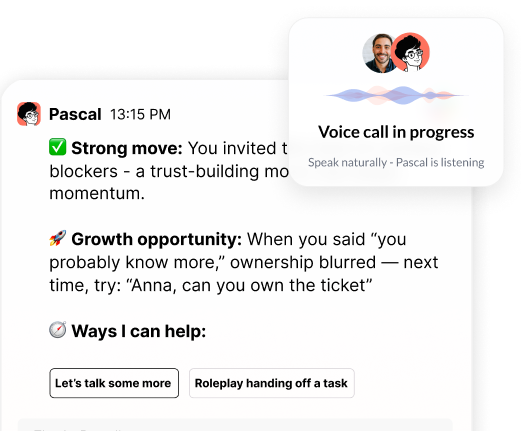
Managers need to stay in the loop so AI guidance reflects real context and backs up their judgment, instead of working against it. The AI should feel like a sharp chief of staff sitting next to the manager, not a script machine sending messages on its own.
When AI operates without manager input, a few things can go wrong fast:
That is when you lose trust in both HR and the technology. People feel like something is being done to them, not with them.
We treat manager-in-the-loop as a core design rule. Pascal gives managers starting points, not final answers. For example, a VP of Customer Support might get suggested talking points for a tough reorg, but they review, edit, and approve before anything goes out. The AI does the heavy lifting on structure and clarity; the manager brings judgment and nuance.
For HR and L&D, this approach keeps:
That is when AI leadership coaching software feels like a partner. It supports better decisions instead of replacing the human who is on the hook for those decisions.
Approvals work best when they live right where managers already are. No new portal, no extra login, no long forms. Just one-tap decisions inside Slack, Teams, or email.
Pattern 1 is lightweight message approvals. Pascal can surface quick buttons like Approve, Edit, or Dismiss right on top of a draft. A Sales Director writing a pipeline recap in Slack might see an improved version with clearer expectations and a simple question, "Use this version?" One tap to accept, or a quick edit to fix a phrase, and the manager moves on.
Pattern 2 is time-boxed approvals in recurring workflows. Review cycles, promotion rounds, or comp changes are perfect for this. Instead of starting from scratch, Pascal can send a short set of scripts or notes and say, "For Friday’s calibrations, confirm this strengths-focused script for each direct report." The manager spends a few minutes approving or tweaking, instead of hours drafting.
Pattern 3 is escalation and delegation without chaos. Senior leaders should:
This keeps the right person in control while avoiding bottlenecks. We want approvals to feel like simple leadership choices, not like managing another inbox.
Managers should be free to edit tone and phrasing, while core structure and guardrails stay fixed. That balance protects fairness and clarity without making the AI feel rigid.
Pattern 4 is an editable surface on top of a structured core. Pascal might give a feedback layout like: situation, behavior, impact, next steps. An Engineering Manager talking to a senior contributor can rewrite examples, adjust language, and match their own style, but the framework still guides them toward specific, behavior-based feedback.
Pattern 5 is clear guardrails for high-risk use cases. For things like performance improvement plans, policy issues, or exits, Pascal anchors the manager in approved language and must-have elements. The manager can:
But they cannot delete the parts that keep the company safe and fair.
Pattern 6 is learning from edits without using customer data to train models. Our stance is simple. We do not use customer data to train our models. Instead, Pascal learns inside each customer’s secure environment, so it can remember one manager’s preferences on tone or terms, and serve better suggestions to that manager later, without feeding that data back into a global model. For large enterprises, this is a key part of security and trust.
This mix of structure plus freedom is what separates AI leadership coaching software from generic text tools. It coaches managers into better habits while still sounding like them.
Context prompts should feel like a quick nudge from a smart partner, not like filling out a form. The goal is to capture the "why" behind choices, so future coaching is sharper.
Pattern 7 is micro-prompts at key decision points. When Pascal spots a sensitive topic in Slack or on a 1:1 agenda, it can ask short questions like:
A VP of Engineering about to realign teams might add two short notes about likely pushback. Pascal then shapes talking points that speak directly to those worries.
Pattern 8 is using context from data that already exists. Channel names, calendar titles, HRIS fields, and tags can tell the AI a lot. Managers only add the nuance AI cannot see, like:
Pattern 9 is building a living leadership profile instead of one static form. Over time, those small context prompts add up into a picture of how each manager leads. Pascal learns their norms, priorities, and communication style, and the coaching feels more personal every quarter, without ever sending that data to train shared models.
HR and L&D can measure impact by looking at behavior signals that already show up in Slack, Teams, and calendars, instead of asking managers to log more activity. The signals of daily work tell a clear story.
Pattern 10 focuses on leading behavior indicators, such as:
Pattern 11 adds quality lenses on AI-assisted interactions. Pascal can scan for things like strengths-based wording, clear expectations, and open-ended questions. For HR, this rolls up into anonymized, aggregated data by cohort. Managers only see their own coaching insights, which keeps it from feeling like surveillance.
Pattern 12 connects all that to metrics HR already tracks. You can look at links between Pascal usage and:
For example, teams where managers use AI-assisted 1:1 prep more often might show fewer complaints about confusing goals during year-end surveys. The key point is that managers do not need to fill out extra dashboards. The system reads what is already happening and turns it into development insight at scale.
If you are ready to elevate how you develop and support your leaders, our team at Pinnacle AI can help you put practical AI tools into action. Explore our AI leadership coaching software to see exactly how it can fit into your current leadership programs. We will walk you through setup, best practices, and real-world use cases so you can move from ideas to measurable results. Start now to give your leaders personalized coaching that scales with your organization.

.png)
.webp)
“Thank you for setting the great foundation for my promotion; now I have a plan!"

Curious to see how AI Coaching can 10X the impact and scale of your development initiatives. Book a demo today for: