

Your AI coach needs four integrations: communication platforms (Slack, Teams), meeting tools (Zoom, Google Meet), HR systems, and calendars. But deploy them in sequence, not all at once.
Start with communication platforms. Add meeting tools second. Layer in HR systems third. Calendars last.
This sequence matters because managers won't use a personalized coach if it requires visiting a separate portal. Basic coaching in the flow of work beats sophisticated coaching in a separate tool.
Here's a summary of the four integration categories, their purposes, and examples:
Data Breakdown:
• Integration Category: Communication Platforms | Purpose: Enable coaching in the flow of work without context-switching | Examples: Slack, Microsoft Teams
• Integration Category: Meeting Intelligence Tools | Purpose: Provide specific, observation-based feedback on meeting facilitation | Examples: Zoom, Google Meet, Microsoft Teams
• Integration Category: HR Systems | Purpose: Add employee context for personalized coaching advice | Examples: Workday, Lattice, Culture Amp, BambooHR
• Integration Category: Calendar Integration | Purpose: Enable proactive coaching based on upcoming meetings and patterns | Examples: Google Calendar, Outlook Calendar
When your AI coach lives in Slack or Teams, managers ask questions during challenging situations. The coach responds in seconds. No context-switching. No separate login. No remembering another tool exists.
When your AI coach lives in a standalone portal, managers must stop work, open a browser, navigate to a URL, re-explain their situation, read the advice, then return to Slack or Teams to apply it. This friction kills adoption.
Deploy your communication platform integration first. Measure daily active usage. Target 70% of managers using the coach within 90 days. Once managers build the habit of asking questions in Slack, add meeting intelligence.
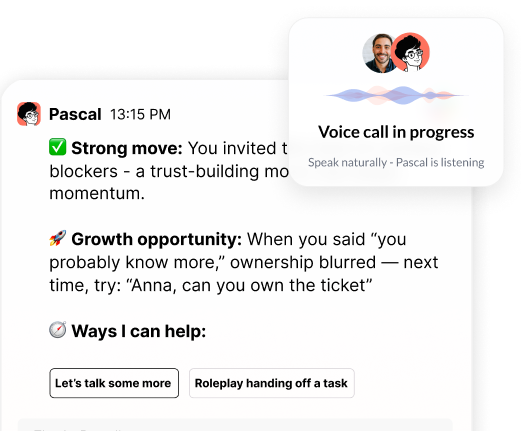
Meeting intelligence means your AI coach attends meetings. It observes who speaks, who stays silent, how long the manager talks versus listens. After the meeting, it delivers specific feedback: "You spoke for 18 of 30 minutes in today's team meeting. Three people didn't contribute. Next time, try asking each person for input before sharing your perspective."
This beats generic advice like "facilitate better meetings." The coach saw what happened. The feedback is specific, immediate, and actionable.
Meeting intelligence requires recording. Address this with your legal team before deployment. Questions to ask: Do we need consent from all participants? Can managers opt out of recording? How long do we retain recordings? Who can access them?
Look for vendors that never train AI models on customer data. If your vendor uses your meetings to improve their product, every conversation becomes training material for other companies. Verify this in writing before signing.
HR systems (Workday, Lattice, Culture Amp, BambooHR) provide context: employee tenure, performance history, development goals, past feedback. This context makes coaching more relevant.
Without HR data, your AI coach treats every manager the same. With HR data, it knows Sarah is preparing for a promotion conversation with an employee who's been passed over twice before. It knows Marcus is managing someone on a performance improvement plan. It tailors advice to each situation.
Add HR system integration after managers trust the coaching quality. Start with minimal data access: names, titles, reporting relationships, tenure. Measure coaching quality. If managers report the advice is too generic, expand permissions to include performance goals and past feedback.
Never give the AI coach access to compensation data, disciplinary records, or mental health information unless required for a specific coaching scenario. Start narrow. Expand deliberately.
Calendar integration transforms reactive coaching into proactive coaching. Instead of waiting for managers to ask questions, the AI identifies opportunities based on upcoming meetings.
Before a 1:1 with a direct report, the coach surfaces preparation topics based on past conversations. Before a skip-level meeting, it offers guidance on building relationships two levels down. Before a team meeting, it recommends facilitation techniques based on that team's dynamics.
Calendar integration also tracks patterns. If a manager schedules 1:1s with some direct reports but not others, the coach flags it. If a manager's calendar shows 40 hours of meetings with zero blocks for focused work, the coach suggests adjustments.
Add calendar integration after HR systems. By this point, managers use the coach daily (communication platform), trust its feedback (meeting intelligence), and receive personalized advice (HR data). Calendar integration adds the final layer: proactive nudges at the moment of need.
Good integration means real-time, bidirectional data flow. The AI coach reads from your systems and writes back to them.
Example: A manager asks the coach for feedback on a direct report's performance. The coach pulls recent 1:1 notes from your HR system, reviews meeting participation patterns from Zoom, checks the employee's goals in Lattice, then drafts feedback. The manager edits the draft. The coach logs the final feedback in your HR system. No duplicate data entry.
Bad integration means batch sync (data updates once daily) or read-only access (the coach can't write back to source systems). If your coach doesn't know about a meeting until tomorrow, it can't help you prepare today. If it can't log coaching conversations in your HR system, you're duplicating work.
Test this during vendor demos. Ask: "If I have a difficult conversation with an employee at 2pm, when will the coach know about it?" The answer should be "immediately" or "within minutes," not "tomorrow morning."
Ask: "If the coach helps me write a development plan, can it save that plan directly to our HR system?" The answer should be yes.
AI coach integrations create new data flows. Every integration is a potential security risk.
Required controls: SOC2 Type 2 certification (this means an independent auditor verified the vendor's security practices for data handling, access controls, and incident response). Zero training on customer data (your conversations never improve the vendor's AI models for other customers). Sensitive topic escalation (conversations about harassment, discrimination, or mental health get flagged for human review). Organization-specific permissions (you control what data the AI can access, not the vendor).
Ask vendors: "Where is our data stored?" (Data residency matters for compliance.) "How long do you retain coaching conversations?" (Shorter is better.) "Who on your team can access our data?" (Fewer people is better.) "What happens if we cancel our contract?" (You should be able to export or delete all data.)
For HR system integrations, scope permissions carefully. The AI coach needs enough context to be helpful but shouldn't access everything. Start with basic profile data. Add performance goals and feedback history only after you've demonstrated value from basic integration.
Track three metrics: adoption rate, engagement frequency, and behavioral change.
Adoption rate: What percentage of managers use the coach? Target 70% within 90 days. Below 50% means your integrations aren't reducing enough friction. Managers are choosing not to use the tool.
Engagement frequency: How often do managers interact with the coach? Target three interactions per manager per week. If usage drops after the first month, your integrations aren't providing ongoing value.
Behavioral change: Are managers improving? Measure 1:1 frequency (are managers holding regular 1:1s with all direct reports?), feedback quality (do direct reports report receiving more specific, actionable feedback?), and manager effectiveness scores (do direct reports rate their managers higher over time?).
Integration-specific metrics: Time to first interaction (how fast do new managers start using the coach after deployment?), proactive coaching acceptance rate (what percentage of calendar-triggered nudges do managers act on?), and cross-system data utilization (is the coach using data from all integrated systems, or just one?).
If adoption is high but behavioral change is low, your integrations are working but your coaching content needs improvement. If adoption is low, fix your integrations before improving content.
During demos, test integrations with your actual data. Ask vendors to show you:
How the coach responds to a question in Slack using real employee context from your HR system. How the coach provides post-meeting feedback using a recorded meeting from your Zoom account. How the coach surfaces a proactive nudge based on an upcoming 1:1 in your calendar. How the coach logs a coaching conversation back to your HR system.
If vendors can't demonstrate these workflows with your data, they're selling vaporware.
Ask: "What data do you need from our HR system to provide personalized coaching?" If they say "everything," they haven't thought through permissions. If they say "just names and titles," they're not providing personalized coaching.
Ask: "How do you handle a manager asking about a sensitive topic like mental health or harassment?" If they say "the AI handles it," run. These topics require human experts.
Ask: "Can we start with communication platform integration only, then add other integrations later?" If they say no, they're forcing you to deploy everything at once. This increases risk and slows adoption.
Deploy communication platform integration first. Measure adoption. Target 70% of managers using the coach within 90 days.
Add meeting intelligence second. Measure whether post-meeting feedback drives behavior change. Look for improvements in meeting facilitation and participation balance.
Add HR system integration third. Start with basic profile data. Expand to performance goals and feedback history only after managers report the coaching is valuable.
Add calendar integration last. Measure proactive coaching acceptance rate. If managers ignore calendar-triggered nudges, the timing or content needs adjustment.
This sequence reduces risk. If adoption fails at the communication platform stage, you haven't invested in complex HR system integrations. If managers don't trust meeting intelligence feedback, you haven't given the AI access to sensitive HR data.
Most AI coach deployments fail because organizations try to integrate everything at once. The complexity overwhelms IT teams. The data access concerns alarm legal teams. Managers get a half-working tool that requires visiting multiple systems to use effectively.
Deploy one integration at a time. Prove value at each stage. Expand deliberately.
Considering an AI coach for your managers? Pinnacle helps organizations deploy AI coaching with the right integration sequence. We start with communication platforms, measure adoption, then layer in meeting intelligence and HR data only after managers trust the coaching quality. Talk to our team about building an integration strategy that drives adoption, not complexity.
Header photo by Vitaly Gariev on Unsplash

.png)
.webp)
“Thank you for setting the great foundation for my promotion; now I have a plan!"

Curious to see how AI Coaching can 10X the impact and scale of your development initiatives. Book a demo today for: