
AI coaching platforms need three types of integrations: communication tools (Slack, Teams) for daily access, HRIS systems for personalized context, and calendar platforms for proactive support. The difference between a tool managers use daily and one they ignore comes down to integration strategy.
Slack and Microsoft Teams integrations determine whether managers use your AI coach or ignore it. Managers get feedback after meetings and ask questions without switching apps.
Portal-based AI coaches see 10-20% engagement within months. Embedded solutions maintain 94% monthly retention. The difference isn't coaching quality—it's friction. When coaching lives where conversations already happen, adoption becomes automatic.
A tech company with 500 employees saw manager engagement jump from 15% to 78% after switching from a portal to Slack integration. Same coaching content. Different delivery mechanism.
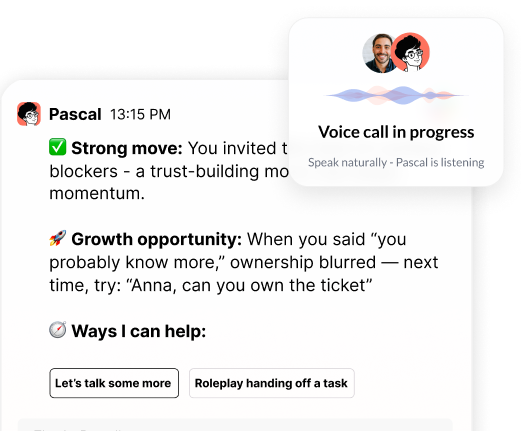
Pascal lives in Slack and Teams, responds to questions in-thread, and delivers post-meeting feedback automatically.
Portal vs. Embedded Integration
Data Breakdown:
• Factor: Initial setup | Separate Portal: 2-3 weeks | Embedded (Slack/Teams): 1-2 days
• Factor: 90-day engagement (managers using tool monthly) | Separate Portal: 10-20% | Embedded (Slack/Teams): 70-90%
• Factor: Context switching required | Separate Portal: Yes | Embedded (Slack/Teams): No
• Factor: Proactive coaching (system initiates conversations) | Separate Portal: Limited | Embedded (Slack/Teams): Native
• Factor: Manager friction | Separate Portal: High | Embedded (Slack/Teams): Minimal
HRIS and performance management integrations turn generic advice into personalized guidance. Without this data, AI coaches give the same response to a VP of Sales and an entry-level coordinator.
The data that matters: role and level, recent performance reviews, development goals, competency frameworks, 360 feedback results, and career aspirations.
When a manager asks "How should I approach this difficult conversation with my underperforming team member?", Pascal references the employee's recent performance review, the company's feedback framework, and the manager's own development goal around delivering direct feedback. That's impossible without HRIS integration.
Most platforms require manual uploads initially. Pascal offers API-driven sync with Workday, Lattice, Culture Amp, and BambooHR, plus secure one-time imports for companies without API access.
Pascal uses organization-level data isolation (your company's data is completely separated from other customers), never trains on customer data, and is SOC2 compliant.
Meeting platform integrations let AI coaches observe real interactions and deliver immediate post-meeting feedback. This is the difference between reactive advice and proactive behavior change.
Jeff Diana, former CHRO at Calendly and Atlassian, notes: "Real learning and value come from in-context coaching—solving problems in the moment, not in a classroom."
Managers receive specific, behavioral feedback within minutes of meetings ending. Example: "You interrupted Sarah three times during the standup—consider asking follow-up questions instead."
Calendar integration lets Pascal review upcoming meetings and suggest preparation strategies, talking points, or potential challenges.
What Pascal observes: Communication patterns, delegation effectiveness, question-asking frequency, interruption patterns, meeting facilitation skills, and follow-through on commitments.
Regulatory considerations: Heavily regulated industries (healthcare, financial services, life sciences) often restrict meeting recording. Pascal offers analysis that captures behavioral insights without storing transcripts, addressing compliance concerns while maintaining coaching effectiveness.
Some enterprises already use approved note-taking tools (Zoom Companion, Teams recording). Pascal integrates with these existing systems rather than requiring new recording infrastructure.
Must-have integrations enable core coaching functionality and drive adoption. Nice-to-have integrations add features but aren't adoption blockers.
For mid-sized companies (200-4,000 employees), prioritize communication platforms and calendar systems first. Layer in HRIS and performance data as you scale.
Must-have integrations (adoption drivers):
• Communication platform (Slack OR Teams)—without this, engagement drops 70%
• Calendar system (Google Calendar OR Outlook)—enables proactive coaching
• Authentication/SSO (Okta, Azure AD)—required for enterprise security
High-value integrations (effectiveness drivers):
• HRIS (Workday, BambooHR, Rippling)—provides role and org context
• Performance management (Lattice, Culture Amp, 15Five)—enables personalized development
• Meeting platforms (Zoom, Google Meet, Teams)—unlocks behavioral feedback
Nice-to-have integrations (add extra features but aren't essential):
• Productivity tools (Notion, Google Drive)—adds document context
• Learning platforms (Degreed, Udemy)—suggests training
• Survey tools (Qualtrics, Glint)—incorporates engagement data
Phased rollout strategy: Start with communication and calendar (week 1), add HRIS data (month 1), integrate performance systems (month 2), layer in meeting observation (month 3). This balances quick wins with comprehensive functionality.
Learning Management System integration connects formal training to daily coaching, but it's not a primary adoption driver.
The real question: does your LMS already drive engagement? If managers rarely log into your LMS, integrating it with your AI coach won't make it valuable. Focus first on integrations that meet managers where they work (Slack, Teams, calendar).
When LMS integration adds value:
• Your organization has high LMS engagement (60%+ monthly active users)
• You want to recommend specific courses during coaching conversations
• You need to track development activity completion
• Your learning paths are tightly connected to performance reviews
When to deprioritize LMS integration:
• LMS engagement is below 40%
• Your focus is behavior change, not course completion
• Managers need in-the-moment guidance more than structured learning
• Budget is limited and you must prioritize integrations
Pascal can reference learning content and suggest resources without requiring LMS integration. For companies with strong learning cultures, the platform offers optional LMS connections to Degreed, Udemy, and other systems.
Integration complexity varies based on your tech stack, data governance requirements, and whether you need real-time sync or periodic updates.
Communication platforms (1-2 days):
Slack and Teams integrations are the fastest. Most organizations complete setup within one business day, including authentication and testing. The main delay is internal approval processes, not technical implementation.
Calendar systems (1-3 days):
Google Calendar and Outlook integrations require OAuth authentication and calendar permissions. Technical setup is straightforward, but some enterprises require security reviews that extend timelines to 1-2 weeks.
HRIS and performance systems (1-4 weeks):
These integrations depend on whether your system offers APIs, what data fields are available, and your data governance policies. Initial setup often involves manual data export while API connections are configured. Ongoing sync happens daily or weekly.
Meeting platforms (1-2 weeks):
Zoom, Google Meet, and Teams meeting integrations require bot permissions and recording approvals. Heavily regulated industries may need legal review, extending timelines to 4-6 weeks.
Key questions to ask vendors:
• What's the typical implementation timeline for our tech stack?
• Which integrations require ongoing maintenance vs. one-time setup?
• What level of IT involvement is needed?
• How do you handle data governance and privacy requirements?
• What happens if an integration breaks—what's your SLA?
The most successful deployments start with a minimal viable integration set (communication and calendar), prove value quickly, then expand to additional systems based on actual usage patterns.
• Communication platform integration (Slack or Teams) determines adoption—without it, engagement drops 70% within months
• HRIS and performance system integrations turn coaching from generic advice into personalized guidance managers trust and apply
• Meeting and calendar integrations enable proactive coaching and behavioral feedback, driving measurable behavior change
• Prioritize must-have integrations (communication, calendar, SSO) before nice-to-have systems (LMS, productivity tools, survey platforms)
• Start with minimal viable integrations to prove value quickly, then expand based on actual usage patterns
The right integration strategy embeds coaching into daily workflow where behavior change happens. See how Pascal works inside Slack to transform manager effectiveness at scale.

.png)
.webp)
“Thank you for setting the great foundation for my promotion; now I have a plan!"

Curious to see how AI Coaching can 10X the impact and scale of your development initiatives. Book a demo today for: