

If you can only pick two integrations, choose your communication platform (Slack or Teams) and your meeting tool (Zoom or Google Meet). Communication platforms drive daily engagement. Meeting tools enable behavioral feedback. HRIS adds personalization but won't matter if managers never open the tool.
The full sequence: communication platform first, meeting tool within 30 days, HRIS by month three. This order works because coaching happens where work already happens.
Managers spend hours in Slack or Teams. They check these tools constantly. When coaching lives there, they engage. When it requires opening a separate portal, they forget.
Slack and Teams enable in-channel coaching, private DMs for sensitive topics, and calendar-triggered prompts before scheduled 1:1s. Email works for Google Chat users but loses conversational flow.
This isn't optional. Managers won't adopt a tool that requires context-switching from their primary workspace.
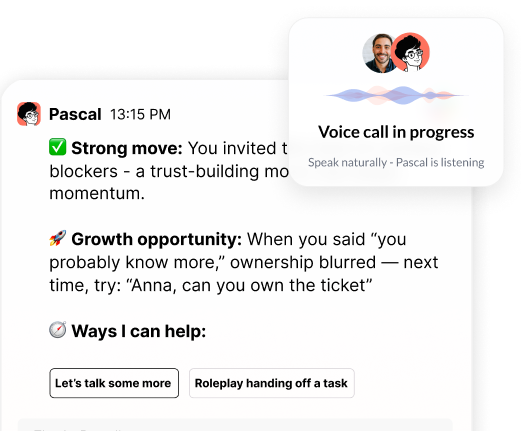
Meeting integrations let AI observe behavior, not just hear about it secondhand. With participant consent, the AI joins meetings, analyzes patterns, and delivers post-meeting feedback.
After a 1:1, the AI might note: "You asked three questions in the first 20 minutes, then shifted to problem-solving. Next time, try five questions before offering solutions."
Pre-meeting prep increases confidence. The AI reviews your calendar and suggests talking points based on the participant and meeting type. Before a performance conversation, you receive frameworks and questions tailored to that employee's recent work.
Privacy requirements: All observation requires explicit opt-in. Look for SOC2 compliance and vendors who never train models on customer data. Meeting data should stay encrypted and isolated to your organization.
One limitation: AI can't read body language or detect sarcasm reliably. It catches interruption patterns, question-to-statement ratios, and speaking time distribution. It misses subtle tone shifts and non-verbal cues.
HRIS integrations (Lattice, Workday, BambooHR) transform generic advice into personalized guidance. The AI pulls performance reviews, goals, org structure, and development plans through read-only connections. This requires IT approval and takes 2-4 weeks to configure.
If a manager's recent review flagged delegation, coaching reinforces that priority. The AI references direct reports' readiness levels and career goals when suggesting delegation opportunities.
Coaching a first-time manager with two reports differs from coaching a director with four team leads. The AI adjusts complexity based on span of control and reporting relationships.
When the AI knows a manager is working on strategic thinking, every interaction reinforces that priority. You can map custom competency frameworks so coaching aligns with your culture.
Implementation reality: Most modern HRIS platforms expose APIs for read access. Setup takes 2-4 weeks depending on data structure and security review. Custom fields require manual mapping, which can extend timelines. Some legacy systems (older versions of ADP, Paychex) lack API access and require manual CSV uploads or prevent HRIS integration entirely.
LMS integrations (Workday Learning, Cornerstone, Degreed) connect training to real-time coaching. The AI references completed courses, suggests relevant modules, and reinforces learning through application.
After a manager completes "Difficult Conversations" training, the AI might prompt: "You finished that course last month. Want to practice the framework before your conversation with Jordan?"
Completion tracking lets the AI build on foundations rather than repeat material. Connecting learning to behavior change (observed in meetings) helps measure training effectiveness.
Alternative: If LMS integration isn't feasible, manually upload key training materials. The AI can reference them in coaching conversations. This takes 4-6 hours upfront but works for organizations without formal LMS platforms.
Google Calendar and Outlook integrations let AI anticipate coaching needs. The AI reviews upcoming meetings and offers preparation support before critical moments.
Thirty minutes before a 1:1, the AI sends: "Want to review talking points for your conversation with Jordan?" This builds a preparation habit.
Context from calendar events includes meeting titles, participants, and recurring patterns. A manager with back-to-back 1:1s receives different coaching than one preparing for a quarterly business review.
Post-meeting follow-up completes the loop. After a performance conversation, the AI checks in: "How did your conversation with Alex go? Want to debrief?"
The most common failure: skipping communication platform integration and starting with HRIS. The coaching becomes personalized but managers never open the tool.
Organizations that try to integrate everything simultaneously often delay launch by 4-6 months while IT works through security reviews and API configurations. A phased approach balances quick wins with implementation capacity.
Legacy systems present technical barriers. Older versions of ADP and Paychex lack API access, requiring manual CSV uploads or preventing HRIS integration entirely. Some IT teams block meeting observation for privacy reasons, eliminating behavioral feedback capabilities.
Slack and Teams dominate because managers already work there daily. These platforms support in-channel coaching, private DMs for sensitive topics, and calendar-triggered prompts before scheduled 1:1s.
Email works for Google Chat users but loses conversational flow and real-time engagement. The key criterion: choose the platform where your managers spend the most time, not the one with the most features.
Deployment takes 1-2 weeks for Slack or Teams versus 3-4 weeks for email-based systems due to threading and notification complexity.
Weeks 1-4: Deploy Slack or Teams. Managers establish engagement habits in their primary tool. Communicate purpose clearly and train managers on first use.
Weeks 5-12: Add meeting platform integration. Coaching shifts from advice to behavioral feedback based on real interactions.
Months 4-6: Integrate HRIS. Coaching becomes personalized to development priorities and team dynamics.
Months 7-12: Connect LMS and calendar based on priorities.
This phased approach balances quick wins with implementation capacity.
You use Webex instead of Zoom: Most AI coaching platforms support Webex, though feature parity varies. Confirm meeting observation capabilities before committing.
You have no LMS: Skip this integration. Focus on communication, meeting, and HRIS connections. You can manually upload training materials if needed.
Your HRIS doesn't expose APIs: You'll need manual CSV uploads or may need to skip HRIS integration entirely. This limits personalization but doesn't prevent deployment.
You're a 10-person startup: Start with Slack and Zoom. Skip HRIS integration until you have formal performance management. Calendar integration provides enough context for small teams.
You're a 10,000-person enterprise: Expect 6-12 weeks for HRIS integration due to security reviews, data governance approvals, and custom field mapping.
Your IT team blocks meeting observation: Deploy without meeting platform integration. You lose behavioral feedback but can still deliver value through communication platform coaching and HRIS personalization.
Data Breakdown:
• Integration Type: Communication | Platforms: Slack, Teams, Email | Key Benefits: Drives daily engagement; eliminates need to open separate tools | Implementation Timeline: 1-2 weeks
• Integration Type: Meeting | Platforms: Zoom, Google Meet | Key Benefits: Enables behavioral feedback from actual conversations | Implementation Timeline: 2-3 weeks
• Integration Type: HRIS | Platforms: Lattice, Workday, BambooHR | Key Benefits: Personalizes coaching with performance context | Implementation Timeline: 2-6 weeks (6-12 weeks for enterprises)
• Integration Type: LMS | Platforms: Workday Learning, Cornerstone, Degreed | Key Benefits: Connects training to application | Implementation Timeline: 3-4 weeks
• Integration Type: Calendar | Platforms: Google Calendar, Outlook | Key Benefits: Enables proactive coaching at critical moments | Implementation Timeline: 1-2 weeks
What integrations should I prioritize first?
Start with your communication platform (Slack or Teams) and meeting tool (Zoom or Google Meet). Communication platforms drive daily engagement where managers already work, while meeting tools enable behavioral feedback from actual conversations.
How long does HRIS integration typically take?
Most modern HRIS platforms require 2-4 weeks for setup, including security reviews and API configuration. Enterprise organizations should expect 6-12 weeks due to data governance approvals and custom field mapping requirements.
Can I deploy AI coaching without meeting platform integration?
Yes, you can deploy without meeting integration if IT blocks observation capabilities. You'll lose behavioral feedback but can still deliver value through communication platform coaching and HRIS personalization.
What if my HRIS doesn't have API access?
Legacy systems without APIs require manual CSV uploads or may prevent HRIS integration entirely. This limits personalization but doesn't prevent deployment—focus on communication and meeting platform integrations instead.
How does LMS integration improve coaching effectiveness?
LMS integration connects completed training to real-time application. The AI references courses managers have finished and prompts them to practice frameworks before relevant conversations, reinforcing learning through behavior change.
Why does integration order matter?
Managers won't adopt tools requiring context-switching from their primary workspace. Starting with communication platforms ensures engagement, then adding meeting and HRIS integrations progressively layers in behavioral feedback and personalization.
• Communication platform integration (Slack, Teams) drives daily engagement by eliminating the need to remember another tool
• Meeting platform integration (Zoom, Google Meet) enables behavioral feedback based on actual conversations
• HRIS integration personalizes coaching using performance context, goals, and org structure
• Phased implementation (communication and meeting tools first, HRIS within 90 days, then LMS and calendar) balances quick wins with implementation capacity
• Integration order matters: start where managers work, add context layers progressively
• If you can only choose two integrations, pick your communication platform and meeting tool
See how Pascal works inside Slack, Teams, and Zoom at https://heypinnacle.com
Header photo by Christina @ wocintechchat.com M on Unsplash

.png)
.webp)
“Thank you for setting the great foundation for my promotion; now I have a plan!"

Curious to see how AI Coaching can 10X the impact and scale of your development initiatives. Book a demo today for: