

AI coaching platforms need five integration categories to drive adoption: communication platforms (Slack, Teams) for daily access, meeting tools (Zoom, Meet) for real-time feedback, HRIS systems for employee context, performance management platforms for goal alignment, and calendar systems for proactive coaching. Standalone platforms fail because managers won't log into another tool.
You're an HR leader or CTO evaluating AI coaching platforms. You need to understand which integrations drive adoption and which are vendor feature bloat. This guide explains the five integration categories that matter, what each one enables, and how to evaluate vendors on integration depth.
The core problem: managers won't adopt another standalone tool. They already juggle Slack, Zoom, their HRIS, and performance management systems. An AI coach that requires separate login and manual context entry becomes shelfware within weeks.
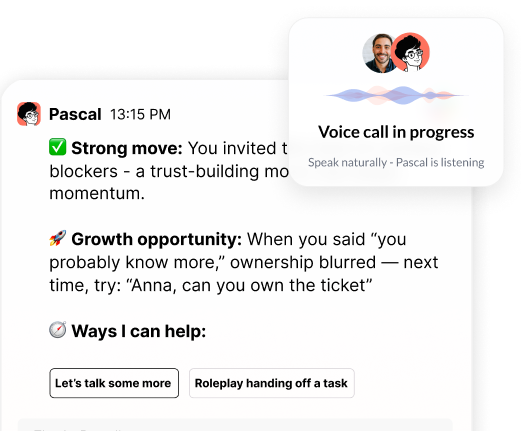
Communication platform integration eliminates the login barrier and delivers coaching where managers already spend 6-8 hours daily. When your AI coach lives in Slack or Microsoft Teams, managers ask questions mid-conversation without opening another app, enabling mid-workflow questions and proactive outreach based on calendar events.
This integration delivers three core benefits: managers access coaching without remembering another password or bookmarking another URL; they can ask "How do I give feedback to someone who gets defensive?" without leaving Slack; and the coach can initiate conversations before scheduled 1:1s to surface relevant guidance.
Implementation consideration: Ensure your vendor maintains SOC2 Type II certification and commits never to train AI models on your data. Ask what channel access the integration requires. The coach should access only channels where it's explicitly added, not monitor all company communication.
Meeting tool integration separates purpose-built coaching platforms from generic chatbots by enabling real-time behavioral observation and immediate feedback. The AI coach attends meetings with explicit consent, analyzes communication patterns, and delivers feedback within 24 hours while conversations remain fresh.
The coach receives a transcript or recording to analyze who spoke most, whether the manager asked open-ended questions, and how they responded to disagreement. It does not share meeting content with anyone else or use it to train AI models. Advanced implementations build memory that understands relationship dynamics, communication styles, and progress over time.
Privacy safeguard: Meeting observation must be opt-in and transparent. Managers control which meetings the coach attends and what data is retained. Participants should see a clear indicator that the coach is present.
An AI coach needs role information, team structure, tenure, and career trajectory from your HRIS to deliver personalized guidance rather than generic advice. Without knowing whether someone manages individual contributors or leads other leaders, their development stage, and organizational context, coaching recommendations remain surface-level.
HRIS integration (Lattice, Culture Amp, Dayforce, Darwin Box) enables four types of personalization: role-based guidance that adapts to management level, development stage awareness for new versus experienced managers, team context including size and remote/co-located structure, and company-specific frameworks that reference your competency models.
Data minimization principle: Only pull data necessary for coaching effectiveness. Most implementations need role title, manager/IC status, team size, tenure, and location. They don't need compensation data, performance ratings, or personal demographics.
Performance management integration ensures coaching conversations directly reference goals, competencies, and review cycles, creating clear connections between development activities and business outcomes. The coach understands which skills matter most in your organization and provides support before performance conversations.
The best integrations don't just pull data—they feed insights back. The coach can surface development themes that inform performance conversations and succession planning. For example, if 60% of managers struggle with delegation, that signals a company-wide development need requiring systemic intervention.
This bi-directional value transforms coaching from individual development to organizational intelligence that shapes talent strategy.
Calendar integration transforms AI coaching from reactive question-answering to proactive preparation. When the coach knows you have a performance review at 2pm or notices back-to-back 1:1s all week, it surfaces relevant guidance beforehand rather than waiting for managers to remember to ask.
This integration enables four capabilities: pre-meeting preparation that surfaces guidance before 1:1s and performance reviews, post-meeting reflection prompts after key interactions, time allocation analysis to ensure managers spend time aligned with priorities, and workload management that identifies delegation opportunities.
Privacy balance: Calendar integration should focus on event metadata (type, participants, duration) rather than detailed content. The coach sees "1:1 with Sarah, 30 minutes" not the meeting notes or agenda.
Organizations make three critical integration mistakes that undermine adoption and create compliance risk.
Over-integration creates data overload and privacy concerns by connecting to every possible system. Focus on the five core categories first: communication platforms, meeting tools, HRIS, performance management, and calendar. Add integrations to knowledge management, project tracking, or CRM only when you have specific use cases.
Under-integration limits the coach to generic chatbot functionality. A coach that only integrates with Slack but lacks HRIS and performance data can't deliver personalized guidance. The minimum viable set includes communication platforms, meeting tools, and basic employee context.
Data governance gaps create compliance risk when integration proceeds without proper controls. Ensure your vendor maintains SOC2 Type II certification, provides user-level data isolation, and never trains models on customer data. Even perfect technical integration fails without clear communication about what data the coach accesses and what value managers receive.
Deeper integration requires stronger data governance to protect privacy and build trust. You need clear policies about what data the coach accesses, how it's used, and who can see coaching conversations before connecting multiple systems.
SOC2 Type II certification verifies the vendor maintains security controls for customer data. User-level data isolation ensures each manager's coaching conversations remain private—the system should not allow one manager to see another's coaching history. No model training on customer data must be explicit in the contract. Granular permission controls let you control what data the coach accesses at organizational and individual levels.
For communication platforms: The coach accesses only channels where it's explicitly added, not all company communication.
For meeting tools: Managers opt in to observation on a per-meeting basis. Participants see a clear indicator that the coach is present.
For HRIS: The coach accesses role information and team structure, not compensation or performance ratings.
For performance management: The coach sees goals and competencies, not peer feedback or manager notes.
For calendar: The coach sees event metadata (title, participants, duration), not meeting notes or agendas.
Data Breakdown:
• Integration Type: Communication Platforms (Slack, Teams) | What It Enables: Daily accessibility without context-switching | Implementation Complexity: Low - Standard OAuth | Primary Privacy Considerations: Channel-level access control; no company-wide monitoring
• Integration Type: Meeting Tools (Zoom, Meet) | What It Enables: Real-time behavioral feedback | Implementation Complexity: Medium - Recording/transcription setup | Primary Privacy Considerations: Opt-in per meeting; participant transparency
• Integration Type: HRIS Systems (Lattice, Culture Amp, Dayforce) | What It Enables: Role-specific guidance | Implementation Complexity: Medium - Data mapping required | Primary Privacy Considerations: Minimal data pull; exclude compensation/ratings
• Integration Type: Performance Management | What It Enables: Goal alignment and business impact | Implementation Complexity: Medium - Competency framework sync | Primary Privacy Considerations: Goals/competencies only; no peer feedback
• Integration Type: Calendar Systems | What It Enables: Proactive coaching triggers | Implementation Complexity: Low - Standard calendar API | Primary Privacy Considerations: Metadata only; no meeting content
Start with communication platforms and HRIS. Add meeting tools and performance management next. Finish with calendar integration.
Data Breakdown:
• Integration Type: Communication Platforms | Key Benefits: Eliminates login barrier; enables mid-workflow questions; allows proactive outreach | Data Accessed: Channel messages where coach is added | Privacy Controls Required: Explicit channel addition; no passive monitoring
• Integration Type: Meeting Tools | Key Benefits: Real-time feedback; behavioral observation; pre-meeting coaching | Data Accessed: Meeting transcripts/recordings | Privacy Controls Required: Per-meeting opt-in; participant notification
• Integration Type: HRIS | Key Benefits: Role-based guidance; development stage awareness; team context | Data Accessed: Role, tenure, team structure, location | Privacy Controls Required: Exclude compensation, ratings, demographics
• Integration Type: Performance Management | Key Benefits: Goal-aligned coaching; competency development; bi-directional insights | Data Accessed: Goals, OKRs, competency frameworks | Privacy Controls Required: Exclude peer feedback and manager notes
• Integration Type: Calendar | Key Benefits: Proactive preparation; time allocation insights; workload management | Data Accessed: Event titles, participants, duration | Privacy Controls Required: Metadata only; no agenda or notes access
This comparison helps CHROs evaluate the value-to-privacy tradeoff for each integration category and prioritize implementation based on organizational readiness.
During vendor evaluation, ask these questions to assess true integration capability:
Native versus bolt-on: Does the platform integrate directly with your core systems, or does it require third-party middleware? Native integrations deliver faster performance and deeper functionality.
Bidirectional data flow: Can the coach both pull context and push insights back to your systems? The best platforms don't just consume data—they enrich your existing tools with coaching-derived insights.
Real-time versus batch: Does the integration provide real-time context, or does it sync overnight? Real-time integration enables in-the-moment coaching. Batch processing limits the coach to historical analysis.
Customization flexibility: Can you control what data the coach accesses at the organizational and individual level? Effective platforms provide granular permission controls, not all-or-nothing access.
Proof of adoption: Ask vendors for adoption metrics from customers with similar tech stacks. Request references from companies in your industry with comparable team sizes.
Most organizations should implement integrations in phases rather than all at once.
Phase 1 (Weeks 1-4): Start with communication platform and HRIS integration. This provides daily access and basic personalization. Managers can ask questions in Slack or Teams, and the coach understands their role and team structure.
Phase 2 (Weeks 5-8): Add meeting tool and performance management integration. This enables real-time feedback and goal alignment. The coach can now observe behavior and connect development to business outcomes.
Phase 3 (Weeks 9-12): Add calendar integration and advanced features. This makes coaching proactive rather than reactive. The coach prepares managers before difficult conversations and identifies time allocation patterns.
This phased approach allows you to validate adoption at each stage before adding complexity. It also gives you time to refine data governance policies and change management communication.
The right integration strategy changes three things for managers:
They get coaching without adding work. No separate login, no manual context entry, no remembering to schedule sessions. The coach meets them where they already work.
They receive guidance at relevant moments. Before a difficult conversation, not three days later. When they're struggling with delegation, not when they remember to ask.
They see development connected to business outcomes. Coaching references their actual goals, team challenges, and company competencies. Not generic leadership advice.
The difference between AI coaching that drives measurable outcomes and AI coaching that collects digital dust comes down to integration depth. Choose a platform that embeds into your existing workflow, not one that requires managers to adopt new tools.
How does communication platform integration improve AI coaching?
Communication platform integration eliminates the login barrier by delivering coaching where managers already spend 6-8 hours daily in Slack or Teams, enabling mid-workflow questions and proactive outreach without context-switching.
Why is data governance critical for AI coach integrations?
Deeper integration requires stronger data governance to protect privacy and build trust. You need SOC2 Type II certification, user-level data isolation, no model training on customer data, and granular permission controls before connecting multiple systems.
What are common mistakes in AI coaching integration?
The three critical mistakes are over-integration (connecting too many systems and creating privacy concerns), under-integration (limiting the coach to generic chatbot functionality), and data governance gaps (integrating without proper security controls and change management).
What HRIS data does an AI coach need for personalization?
AI coaches need role title, manager/IC status, team size, tenure, and location to deliver personalized guidance. They don't need compensation data, performance ratings, or personal demographics—only context necessary for coaching effectiveness.
How does performance management integration align coaching with business goals?
Performance management integration ensures coaching conversations directly reference goals, competencies, and review cycles, creating clear connections between development activities and business outcomes while providing bi-directional insights that inform talent strategy.
Why is meeting tool integration critical for behavioral feedback?
Meeting tool integration enables real-time behavioral observation and immediate feedback by allowing the AI coach to attend meetings with explicit consent, analyze communication patterns, and deliver feedback within 24 hours while conversations remain fresh.
• Communication platform integration drives daily adoption by meeting managers where they already work
• Meeting tool integration enables real-time behavioral observation and immediate feedback
• HRIS integration provides organizational context necessary for personalized guidance
• Performance management integration ensures coaching reinforces strategic priorities
• Calendar integration transforms coaching from reactive to proactive
• Data governance protects privacy and builds trust across all integration points
• Phased implementation validates adoption before adding complexity
See how Pascal integrates with your tech stack to deliver coaching in the flow of work.
Header photo by Jj Englert on Unsplash

.png)
.webp)
“Thank you for setting the great foundation for my promotion; now I have a plan!"

Curious to see how AI Coaching can 10X the impact and scale of your development initiatives. Book a demo today for: