
.jpg)
If your managers primarily work in Slack, use Slack for in-chat AI coaching. If they live in Microsoft 365 and run work through Teams meetings and channels, use Teams. In hybrid environments, deploy to both so each group gets coaching in their native tool, as long as that aligns with your security and governance model.
The best place to roll out in-chat AI coaching is the tool where your managers already spend most of their time, usually Slack or Teams. The real decision is not which platform is better in general, but which one fits your security model, admin preferences, and how your people actually work together.
Right now, a lot of HR, L&D, and IT leaders are doing mid-year planning. You are looking at performance cycles, promotion windows, and what support managers will need in the second half of the year. That is exactly when it makes sense to compare Slack and Teams as home base for an AI employee development platform.
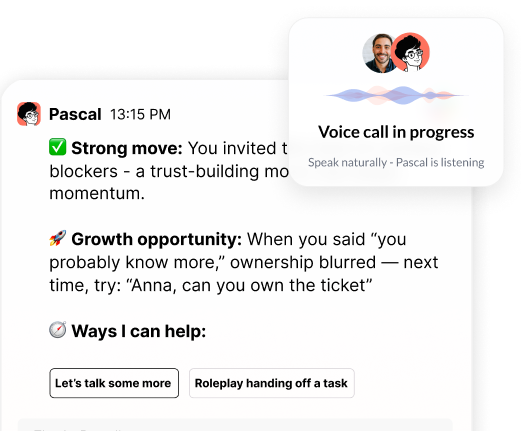
When we say in-chat AI coaching, we mean AI that lives inside Slack or Teams, not a separate LMS or content library. Managers can get real-time nudges, feedback, and role-play help in the middle of real work. Our goal here is simple: give you practical, side-by-side guidance on user experience, admin controls, security, and rollout patterns.
AI coaching in Slack usually feels faster and more conversational, while in Teams it is more tightly integrated with meetings, calendars, and structured channels. The better fit depends on whether your managers are more message-heavy or meeting-driven.
Day to day, the biggest difference is how naturally AI coaching fits into existing habits. Slack leans toward quick, informal back-and-forth. Teams mixes chat with meetings, channels, and files in one place. That shapes how managers feel and use AI support.
In Slack, core manager flows often look like this:
In Teams, patterns look a bit different:
Here is how this plays out in real life. A VP of Engineering using Slack might pull the AI coach into a private channel five minutes before a performance talk, run a quick role-play, adjust their wording, then jump into the actual meeting feeling ready. A Sales Director in Teams might get prompts before a weekly pipeline review, then see follow-up coaching in their 1:1 chat to help them debrief the meeting with each manager.
So the practical question is: are your managers more async and message-heavy, or more meeting-driven? Slack often works best for fast, informal coaching. Teams often fits best where work is organized around scheduled meetings and structured channels. Both can support an AI employee development platform well, but adoption will follow your current habits.
In Slack, you typically control AI coaching via workspace-level permissions and app policies, which makes piloting with specific groups straightforward. In Teams, controls are more tenant-centric and align with your existing Microsoft 365 governance, which often suits larger or more regulated enterprises.
For admins, the key differences are how precise your controls are for app permissions, data access, and workspace or tenant governance. Slack and Teams handle that in different ways, and those choices affect how HR and IT work together.
In Slack, common admin patterns include:
This makes it fairly easy to start small, for example one region or one function, then scale to more workspaces as you prove value.
In Teams and Microsoft 365, the picture is more tenant centric:
Here, the AI coach fits into the same governance patterns you already use for other apps and data. That can be an advantage for large enterprises where nothing goes live without a clear policy.
For CHROs and IT leaders, the shared goal is simple: build guardrails that let coaching happen in real moments, but still respect data minimization, access rules, and internal policies. The right answer will match the way your admin teams already work.
Security expectations for in-chat AI coaching are essentially the same on Slack and Teams; the real difference is how your AI platform handles data residency, retention, access, and model training. You should expect strict isolation of your data, clear retention settings, and no use of customer data to train general models.
Security expectations are almost the same for Slack and Teams. Legal and security teams want to know how data moves, who can see it, how long it lives, and whether it trains any models. The twist is that the questions they ask depend on where your data already sits and how your AI platform is built.
Across both platforms, enterprise buyers usually expect:
On Slack, specific topics that come up are:
On Teams and Microsoft 365, security teams tend to ask about:
To move faster, it helps to walk into reviews with a short checklist:
When those answers are clear, the choice between Slack and Teams becomes mostly about organizational fit rather than perceived risk.
Slack deployments usually move faster for smaller or more flexible companies, while Teams deployments tend to follow established Microsoft 365 approval and change processes. In both cases, a staged pilot with a defined manager cohort is the most effective pattern.
IT rollout is often quicker in Slack for smaller or more flexible companies, while Teams deployments usually snap into existing Microsoft 365 processes. In both cases, a staged pilot with managers works best.
Typical Slack rollout patterns:
Typical Teams rollout patterns:
Seasonal timing matters. Many companies use the June to September window to test in-chat AI coaching before heavy performance and promotion cycles start. That way, by the time year-end reviews hit, managers have already practiced hard conversations with the AI coach and know how to pull it in when pressure is high.
Use Slack for AI coaching if it is your primary collaboration hub and your culture leans on fast, async chat. Use Teams if most work runs through Microsoft 365, meetings, and structured channels. Choose a hybrid model when large groups of managers rely on different tools and your security model supports both.
The simple rule: pick Slack if it is your central collaboration hub and your culture leans on fast chat. Pick Teams if your managers live inside Microsoft 365 and run most work through meetings and structured channels. Consider a hybrid model when different parts of your company rely on different tools.
A practical decision framework:
Some organizations run Slack for product and engineering and Teams for back-office teams. In those cases, a dual deployment lets every manager get the same quality of AI coaching in the tool that feels native to them. Others standardize on Teams and lean on the AI coach before and after recurring client, engagement, or review meetings.
At Pinnacle, we built Pascal to live in both Slack and Teams so HR, L&D, and IT do not have to trade off. We focus on meeting managers where they already work, supporting the real conversations that shape performance and culture, and giving leaders an AI employee development platform that fits into the flow of work instead of becoming one more separate app.
Transform how your team learns and performs by leveraging our AI employee development platform to deliver personalized, real-time support at scale. At Pinnacle AI, we help you pinpoint skill gaps, track progress, and give every employee a clear path to improvement. Start integrating AI-powered coaching into your existing development programs so your people can grow faster and contribute more. Let us help you build a learning culture that keeps your organization ahead of change.

.png)
.webp)
“Thank you for setting the great foundation for my promotion; now I have a plan!"

Curious to see how AI Coaching can 10X the impact and scale of your development initiatives. Book a demo today for: