

Most leadership coaching should move out of the LMS because managers need guidance in the tools where work actually happens, not in a separate course catalog. The LMS should stay the home for long-form, compliance, and system-of-record content, while everyday coaching shifts into Slack, Teams, and other live workflows.
Managers do not live in a course catalog. They live in Slack, Teams, 1:1s, project channels, and escalation threads. When coaching only shows up as a course to complete, it arrives late and often gets ignored.
An LMS is built for static, episodic learning. People have to remember a login, search for a module, then sit through content that may or may not match the situation in front of them. Real coaching moments look very different. They show up when a renewal is at risk in a channel, when a project slips in a standup, or when a tough feedback conversation is about to start.
Workplace coaching technology has shifted from “go take this course” to “get timely, contextual help in the flow of work.” A VP of Customer Success heading into a heavy renewal season does not need a 90-minute leadership module hidden behind three clicks. They need short, pointed nudges, scripts, and questions posted right in the renewal channel.
We are not talking about tearing out your LMS or pretending formal learning is done. We are talking about a practical, step-by-step migration plan that moves everyday coaching into always-on tools like Slack and Teams, while your LMS stays the home for long-form and compliance content.
You know your coaching has outgrown the LMS when managers only visit it in emergencies, completion is low, and leadership behaviors are not changing in day-to-day conversations.
You can usually feel this before you can measure it. Some common signals show up across People, HR, and L&D teams:
Operational pain shows up too:
There is also a clear behavior pattern. Managers do not log in to the LMS until something breaks. A performance issue, a complaint, a painful exit interview. That is the wrong order. Coaching should build habits every week, not mop up messes after the fact.
Think about a Director of Sales Operations who sees that new manager training is “complete” in the LMS, yet pipeline reviews are still chaotic. Forecast calls run long, feedback is vague, and action items drift. The problem is not the slides. It is that coaching never shows up where the behavior lives.
If most leadership challenges surface in Slack, Teams, and 1:1s, but your coaching lives in an LMS, you do not have a content problem, you have a location problem.
Start by moving high-impact, high-frequency, situational coaching use cases into Slack and Teams, and leave deep, infrequent, or compliance-heavy content in the LMS.
Not everything should move. Your LMS still plays an important role, especially as a system of record. The smart move is to start with high-impact, high-frequency coaching use cases.
First, map your current coaching inventory. Common categories include:
Then classify each topic into three buckets:
Take a VP of Engineering with 12 direct reports. Here is a practical split:
This is where workplace coaching technology and AI can help. Instead of sending generic leadership tips, you can generate tailored prompts from your own competency models, values, and past interactions. Managers see guidance that sounds like your company, not a random article.
Use four tests: Relevance, Frequency, Context Sensitivity, and Risk, to decide what moves into always-on tools, what stays in the LMS, and what should be hybrid.
A simple way to make clean decisions is to run each coaching asset through four tests: Relevance, Frequency, Context Sensitivity, and Risk.
A simple decision grid could look like this:
This way, you consolidate where it makes sense and lower the noise for managers instead of adding yet another place to check.
Govern AI coaching by treating it as an extension of your leadership framework, with clear roles, guardrails, and review cycles shared across HR, L&D, and IT.
AI coaching should not float as a side project. Treat it as an extension of your leadership framework. That means clear guardrails, owners, and review cycles.
Governance roles usually break down like this:
Define what AI is allowed to do and not do:
Set a clear content lifecycle. A simple quarterly review of prompts, examples, and playbooks based on real usage can keep everything sharp. You can look at where managers ask for extra help, what gets ignored, and which prompts lead to better outcomes.
Some HR teams create a short “coaching charter” that covers tone, escalation rules, and how AI suggestions connect back to company values. That keeps support consistent, even across regions and seasons.
A practical 90-day roadmap starts with an audit and pilot, then configures AI coaching in Slack or Teams, and finally scales what works while clarifying what stays in the LMS.
A clean migration from LMS-heavy coaching to always-on workplace coaching technology does not need to drag on. Here is a practical 90-day path.
Days 0 to 30:
Days 31 to 60:
Days 61 to 90:
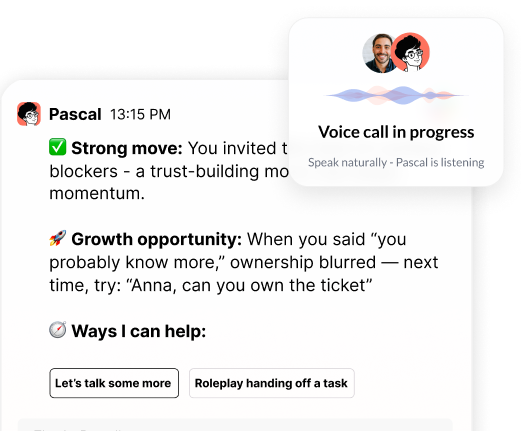
We built our AI coaching companion to live in tools your people already use every day, so leadership coaching can show up in the moment, not weeks later. When you treat the next quarter as a controlled experiment in how your managers actually learn to lead, the LMS can do what it does best, while real-time coaching finally moves into the flow of work.
If you are ready to elevate performance with data-informed coaching, we can help you put the right tools and strategy in place. At Pinnacle AI, we guide you through selecting and implementing workplace coaching technology that actually fits how your teams work. Explore practical frameworks, use cases, and roll-out steps so you can move from trial-and-error to consistent, measurable growth. Start building a more capable, confident workforce by taking your next step today.

.png)
.webp)
“Thank you for setting the great foundation for my promotion; now I have a plan!"

Curious to see how AI Coaching can 10X the impact and scale of your development initiatives. Book a demo today for: